Product · Development · QA — on one platform

Autonomous
Software Engineering

From requirement to reviewed pull request. Then it keeps systems healthy.

keid.in is autonomous software engineering: it builds software from your requirements, auto heals what its continuous audit finds, and evolves the system as intent changes — every agent reading from one Knowledge Center, every merge behind a human approval gate.

  • Requirement-to-merge traceability
  • Human approval gate before every merge
  • Works inside your repo, branches and PRs
  • Any model — OpenAI, Anthropic, open-weight
audit domains, every run
30+
languages in the call graph
9
governed LangGraph workflows
5
Knowledge Center surfaces
7
human gate before anything merges
1

The platform

Build. Auto Heal. EvolveThree engines, one governed loop

Each engine is a LangGraph workflow you can watch stage by stage. They share one Knowledge Center, one approval model, one audit trail and one bill — so adopting AI across an organisation stops being a collection of individual experiments.

01 · Build

A requirement goes in. A reviewed pull request comes out

Write the requirement the way you would for an engineer. The Solution Engineer turns it into an analysed, validated, staged plan; the Code Patch Engine then implements it on a fresh branch of your repository and opens the PR — with per-stage token, cost and duration metrics attached to the run.

  • Business analysis, solution architecture and validation run as separate governed agents — you approve the plan before a line of code is written.
  • Implementation is accuracy-first: analyse → plan → reason → generate → pre-validate → review, then a PR on your own repo.
  • Every stage streams its output live; pause, steer or retry from the failed stage without re-running the whole thing.

Solution Engineer

  1. Knowledge loader
  2. BA analyst
  3. Solution architect
  4. Validator
  5. Plan generator

Code Patch Engine

  1. Branch provisioner
  2. KC loader
  3. Analyzer
  4. Planner
  5. Reasoner
  6. Generator
  7. Pre-validator
  8. Reviewer
  9. PR generator

Approval gate sits between the plan and the first commit.
02 · Auto Heal

Continuous audit finds the cracks. Maintenance closes them

keid.in runs a persistent, incremental code audit across more than thirty domains — from injection and secrets to concurrency, memory leaks, dead code, Docker, Terraform and CI/CD. Findings arrive with evidence and a criticality rank, and the ones you accept become requirements the Maintenance profile fixes on a branch, in a sandbox, behind your gate.

  • 32 audit domains ranked by criticality — security first, style last — with cross-file analysis where it matters (auth, dead code, dependencies).
  • Incremental by design: re-audit only what changed since the baseline, so the audit stays cheap enough to run every time.
  • Fixes run in an isolated agent sandbox, are validated before the PR, and write what they learned back to the Knowledge Center.

Code Audit

  1. Repo provisioner
  2. KC context loader
  3. Repo scanner
  4. 32 domain agents
  5. Finding aggregator
  6. Quality gate
  7. Report

Maintenance

  1. Clone
  2. Analyzer
  3. Planner
  4. Executor
  5. Validator
  6. PR
  7. KC learn

Accepted findings flow into Maintenance as first-class requirements.

03 · Evolve

Intent changes. The system re-derives itself

Because the requirement is the unit of work, nothing in keid.in is a one-off prompt. Change the requirement and the plan, the branch and the PR are regenerated against a Knowledge Center that already knows what the last increment did, which decisions it superseded and which documentation has since drifted from the code.

  • Every merged increment is learned back — implemented artifacts, decisions and constraints become context for the next run.
  • Drift detection tells you, in commits, how far each page has fallen behind the code it documents.
  • Agents, workflows and models are configured per project: swap the LLM behind any stage with zero architectural impact.

The loop

  1. Requirement v1
  2. Increment
  3. KC learn
  4. Audit
  5. Requirement v2
  6. Increment

Supersession links keep the history; nothing is deleted, only outgrown.

Knowledge Center

The memory every agent reads before it writes

Most AI coding tools start every task from zero. keid.in starts from a living, graph-shaped model of your codebase, its documents, its decisions and its history — built automatically from the repo, kept honest by drift detection, and assembled into a purpose-built context package for each stage of each workflow.

It is also a product in its own right: the Knowledge Center is the place a team goes to ask what the system does, prove that a policy is enforced, and see which page is lying about which file.

Call graphKnowledge graphHybrid retrievalDrift detectionContradiction detectionJira & ConfluenceOCR for PDFsCompliance matrix
implemented_bydecided_byhandles_routeuses_tabletestsconstrainssupersedesRequirementADR 0001billing_service.pyPOST /api/v1/depositsorg_walletstest_billing.pySpend policy

typed edges · confidence scores · supersession history

Seven surfaces, seven questions

Pulse

What needs attention this week?

What changed, what is rotting, what the team asked and could not be answered.

Explore

What do we have?

Faceted search across code, docs, decisions, tickets and requirements.

Read

What does this say — and can I trust it?

Versioned pages with verification status, diffs and backlinks.

Ask

What is the answer?

Grounded answers with citations back to the exact chunk and commit.

Map

How does it all connect?

The knowledge graph and decision timeline, rendered and navigable.

Curate

What needs my decision?

A review queue for extracted facts, contradictions and low-confidence units.

Comply

Can we prove it?

Control matrix and coverage: which policy is satisfied by which code.

And every workflow stage — Build, Heal or Evolve — reads from the same graph and writes what it learned back.

Ingest everything

Source in nine languages parsed into call graphs and type definitions. PDF, DOCX, XLSX, Markdown and CSV with layout-aware OCR. Jira and Confluence through native connectors.

Graph, not a pile

Implements, extends, tests, calls, documents, constrains, supersedes, decided-by — typed edges with confidence scores, contradiction detection and canonical examples.

Context built per agent

Each agent has its own context specification and token budget. Hybrid vector + text + recency retrieval assembles exactly the package that stage needs — nothing more.

Drift you can measure

For every documented file: commits behind, since the page was published, taken from the actual git history. Publishing is a separate, audited act.

How it works

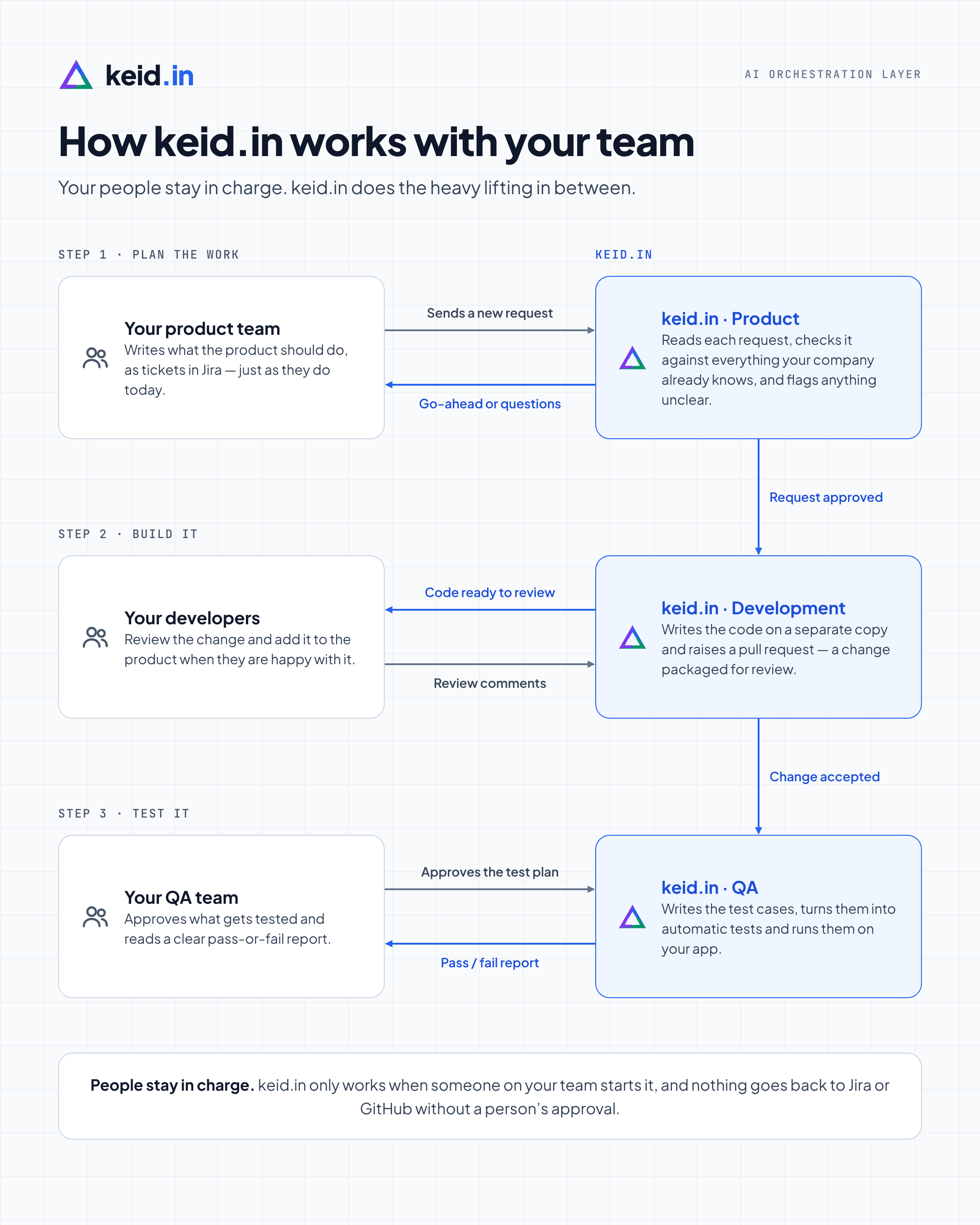
Your people stay in charge. keid.in does the work in between

Autonomous software engineering that slots into the way your teams already work — Jira for requirements, GitHub for code, your own people for every decision that matters.

  1. 1

    Plan the work

    Your product team writes tickets in Jira, just as they do today. keid.in Product checks each request against everything your company already knows and comes back with a go-ahead or questions.

  2. 2

    Build it

    Once a request is approved, keid.in Development writes the code on a separate branch and raises a pull request. Your developers review it and merge when they are happy.

  3. 3

    Test it

    When the change is accepted, keid.in QA writes the test cases, your QA team approves the plan, and keid.in automates and runs the tests and returns a pass-or-fail report.

keid.in only works when someone on your team starts it, and nothing goes back to Jira or GitHub without a person’s approval.

Diagram: How keid.in works with your team. Step 1, plan the work: your product team sends a new request; keid.in Product replies with a go-ahead or questions. Request approved. Step 2, build it: keid.in Development sends code ready to review; your developers reply with review comments. Change accepted. Step 3, test it: your QA team approves the test plan; keid.in QA returns a pass or fail report. People stay in charge: keid.in only works when someone on your team starts it, and nothing goes back to Jira or GitHub without a person's approval.
How keid.in works with your team · open full size

Under the hood

One loop, from intent to increment — and back

Nothing runs unattended that shouldn't. Every stage is visible, reviewable and reversible; the process is the SDLC your team already runs.

  1. 01

    Connect

    Point keid.in at a repository. Project Understanding clones it, builds the call graph and seeds the Knowledge Center.

  2. 02

    Capture

    Intent lands as a first-class requirement — scoped, versioned, and linked to the code it will become.

  3. 03

    Approve the plan

    Solution Engineer produces an analysed, validated plan. A human signs it off — or sends it back.

  4. 04

    Implement & review

    The Code Patch Engine works on a branch, self-reviews, and opens the pull request in your workflow.

  5. 05

    Audit & learn

    The merged increment is audited and learned back. The next requirement starts smarter than the last.

Built for organisations, not just engineers

Governance is the product, not a settings page

Organisation is the billing root. Every run has an owner, a cost, a policy decision and a receipt.

  • Role-based access with an org as the billing root
  • Audit log with actor context and CSV export
  • Cost attribution per run, project and organisation
  • Policy engine, plans, seats and quotas
  • TOTP MFA, OIDC SSO, rotating API keys
  • Signed run receipts for every workflow
  • Sandboxed agent execution
  • GDPR export and erasure built in

Connect your own repository and issue tracker — keid.in works inside your branches, your reviews, your history. Python, TypeScript, Java, Go, C#, Rust, Ruby, PHP and Kotlin are understood out of the box.

Why keid.in

The fast path to AI adoption, at team scale

One engineer picking up an AI tool is easy. A whole organisation adopting AI safely, consistently and affordably is a different problem — that's the one keid.in is built to solve.

Observability & traceability

Every requirement, prompt, model call and approval is logged and linked. When something ships you can trace exactly how it got there.

Consistent output

The same requirement produces the same quality of work, whichever agent or model picks it up. Structure removes the variance of ad-hoc AI use.

Requirements, not prompts

Engineers write requirements. keid.in does the structuring and context assembly, so good output doesn't depend on the team's best prompter.

Model-agnostic by design

Every agent sits behind a provider router. Swap OpenAI, Anthropic or a local Ollama model for any stage with zero architectural impact.

Per-project agents & workflows

Configure agents, prompts and workflow profiles per project or codebase. keid.in adapts to how your teams already work.

Cost and access control

Spend limits, credits and permissions by organisation, project and role. Nothing gets discovered at the end of the month.

Your SDLC, agentic execution

Requirements, branches, pull requests, human review — the process stays yours. Agents execute inside it, not around it.

Open-weight where it pays

Route low-reasoning stages to open models for a fraction of the cost and keep frontier models for the work that needs them.

AI Orchestration Layer

Why “keid.in”

One triangle, three arms, no beginning

The mark is a single shape rotated twice — three arms of identical thickness, 120° apart, interlocking into a triangle you cannot find the start of. Each arm is one of the engines, and the loop is the argument: work leaves one arm and arrives at the next, so the system is never finished, only further along. The name comes from Keid, the triple star in Eridanus; the wordmark keeps the whole domain, with the .in in Build’s azure.

Build
A requirement goes in; a planned, implemented and self-reviewed pull request comes out on your own repository.
Auto Heal
A continuous, incremental code audit finds the cracks; the Maintenance workflow fixes them on a branch, behind your approval gate.
Evolve
Every merged increment is learned back into the Knowledge Center, so the system re-derives itself as requirements change.

Bring a requirement. Leave with a pull request

Sign in to your console, or ask us for a walkthrough on your own repository — a human replies.

Create an account

Or write to us at keid@noventis.ai — a product of Noventis Pvt Ltd.